

Peugeot & Citroën Vehicle Keys: Hints and Tips
Peugeot & Citroën Vehicle Keys trouble Shooting Tips
Owning a Peugeot or Citroën car , van or motorhome often comes with a familiar sense of practicality and reliability. 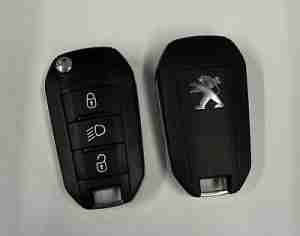
But when a key issue crops up, whether the remote won’t work or the car won’t start after a battery change, it can be frustrating.
This guide provides practical hints and tips to troubleshoot common key and remote problems.
With a focus on situations like a changed car battery, a changed case on the remote, or a remote that suddenly stops working.
When a car wont start or when the remote doesn’t work , the owners first thought is that their key is faulty, This is often not the case. 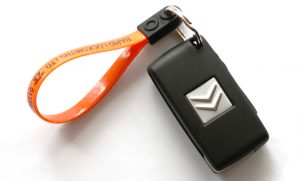
In Fact , much of the time such problems can be avoided by following correct procedure or simply fixed DIY.
So The Focus of this guide is to assist Peugeot & citroen vehicle owners and includes self help sections to save you time and money.
Introduction: Understanding the Most Common Key Issues
Both Peugeot and Citroën use smart keys and remote locking systems that can behave differently from traditional keys. When problems arise, they are often due to one of a few common causes:
- The remote control has lost its programming or needs to be re-synced with the car.
- The car battery replacement affects the immobiliser or key recognition briefly.
- A recently changed remote case or shell has mis aligned buttons or internal contacts.
- The vehicle’s central locking or immobiliser is itself experiencing a fault or needs a reset.
By following clear troubleshooting steps, you can often fix the issue without a costly trip to the dealer.
Section 1: Diagnostics When the Remote Won’t Work
If you notice that your Peugeot remote not working or your Citroën remote not working, start with these checks:
- Check the key battery: Even if the blade works, the remote may fail due to a weak battery. Replace the battery with the correct type (usually CR2032 for many models) and test again.
- Inspect the buttons and case: A cracked or damp remote can cause poor contact or button sticking. If you recently changed the case on the remote, ensure all contacts are clean, the PCB is seated properly, and the battery is making solid contact.
- Re-synchronisation: Some models require re-pairing the key to the car after a battery change or remote case replacement. This process varies by model year and may involve turning the ignition to a certain position and pressing specific buttons within a time window. Consult the owner’s manual for the exact procedure or seek guidance from a trusted source.
- Try the spare key: If you have a second remote, test it. If the spare works but the primary does not, the issue is likely with the remote itself rather than the car.
So Let us offer some useful tips on how to troubleshoot and fix the most common issues;
Ive changed the battery in my key , but remote wont work.
This Is the most common problem we get calls for and can often be easily fixed yourself, it is normally down to just a few issues. 
The first relates to the battery you have fitted , this as silly as it may sound is a very common issue, so check following;
- If using a quality battery like duracell and some others , these often put either a paper sticker or clear sticker on negative side of the battery. So many forget to remove this sticker or dont see it as easily missed . so check the battery for a sticker as wont work until removed. The negative side of the battery is the side without writing or branding.
- If you have a tester , test the battery has power. its sounds odd as new , but we see a lot of batteries purchased from discount stores , online and even from supermarkets that are flat straight from the packet.
- Always use a good quality battery , most cars prefer quality makes like Panasonic , Duracell , Renata and Maxell.

- Always use the correct battery , ie CR2032 , CR1620 etc.
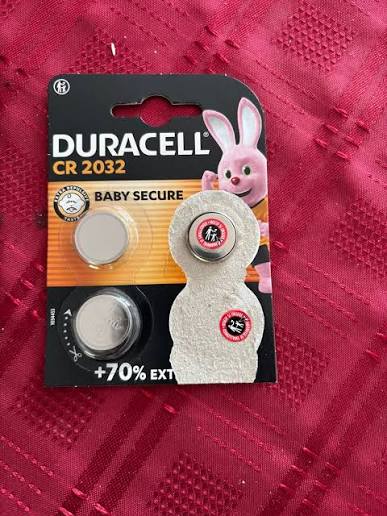
Lets assume that you have fitted a good quality battery inside your key correctly , the remote still wont work !
This is very common , and the remote often just needs a quick manual Resynch DIY , the common procedures are below;
Resynch procedure for the most common flip remote keys
- insert your key into the ignition and switch the ignition on to position 2 when dash lights up.
- Now press and hold down the lock button on the remote for 5 full seconds.
- After the 5 seconds release the lock button on the remote.
- Switch off the ignition and remove the key
- test your remote control.
Some older peugeot and citroen remote keys with fixed blades differ slightly , for these on step 3 instead of holding lock button for 5 seconds , hold for 10 seconds.
This will normally resolve the issue for you on bladed keys. if not then it may be a broken key.
Resynch procedure for smart push button start keys
after a battery change in the key its not uncommon for the remote not to work, or the keyless start not to work.
The resynch procedire is similar to bladed keys and is below. 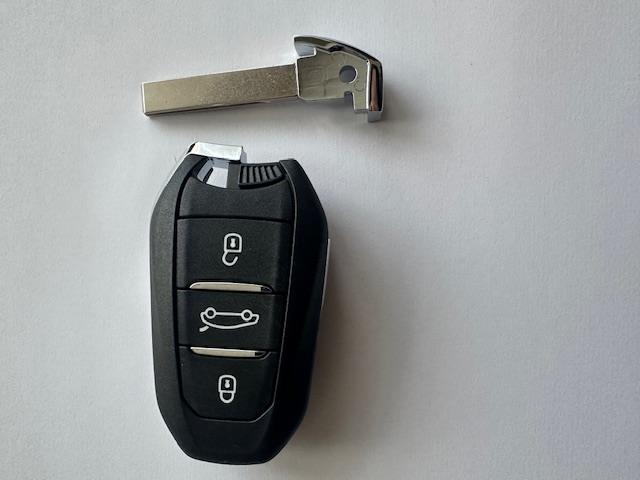
- Hold your key against the emergency start position on steering column and keep it there for now.
- do not press clutch , just press the start button to turn on the ignition.
- with ignition on NOW remove the key from the emergency start position.
- press and hold down the lock button on the remote for 5 seconds
- after 5 seconds , release the lock button on your remote and press the start button on car to turn off the ignition
- Test your remote control
NB: for the older keyless start models with a slot you need to insert key into , step one will be insert key in slot , turn ignition on and remove key from slot and follow steps 2 to 6.
Section 2: The Impact of a Battery Change on Starting
A common scenario is “changed car battery and car won’t start.”
When the car battery is replaced on all peugeot & citroen vehicles, It is essential you follow the correct procedure !
Failure To Follow the correct procedure when disconnecting your vehicles battery often KILLS YOUR VEHICLE !
This results in a very expensive repair and New BSI ( Body Systems Interface) to be fitted, so take heed.
To explain why this happens and the BSI gets corrupted , you need to understand why this happens. The BSI is the brain of your car , so a computer, it controls most of the operational functions on your car. A BSI is can be likened to an old windows computer system , with a windows computer you must shut down the computer before cutting power to the pc. failing to shut down can corrupt your system.
The BSI is the same , if not fully shut down before disconnecting a battery lead, it will corrupt and damage your system, rendering the vehicle a non runner.
When ever you operate anything on the car , the bsi is woken up , things like opening the car door , opening the bonnet will all wake up the bsi unit. Once woken up the bsi will quickly realise its not needed and will shut itself down , this takes 4 minutes to shut down. So it is essential you do not disconnect battery leads until fully shut down or risk killing your vehicle. This is called the 4 minute rule and should always be followed when disconnecting a peugeot or citroen vehicle battery. The 4 minute rule is listed in the battery disconnection procedure below.
Official peugeot & citroen battery disconnection procedure following the 4 minute rule.
To reduce the risk of BSI problems:
- Turn everything off (lights, radio, ignition).
- Remove the key and close the doors (leave a window open if needed) and open the bonnet.
- Wait 4–5 minutes so the BSI enters sleep mode.
- Disconnect the negative (-) terminal first, then the positive (+).
- Install the new battery.
- Connect the positive (+) first, then the negative (-).
- Wait about a minute before switching the ignition on.
- Turn the ignition on and wait a few seconds before starting the engine.
its a simple yet Essential procedure to follow , that saves a 4 figure bill to fix.
Never Disconnect any peugeot or citroen vehicle battery without following the 4 minute rule.
Section 3: Replacing the Remote Case: What to Check
You mentioned “changed case on remote and car wont start.” A remote case replacement can only affect starting if:
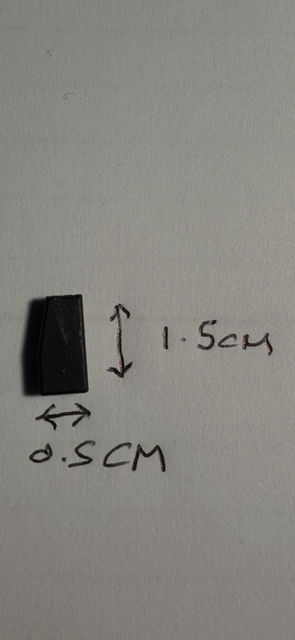
- On older fixed blade keys , you have forgot to transfer the transponder chip from the old case to the new and have only transferred the circuit board. go back to the old case and locate and remove the black carbon transponder chip and put it in the same position in the new case.
- for flip remote keys , the transponder chip is not separate to the circuit board , so with these the transponder chip is soldered to the circuit board. Only the circuit board needs moving to the new case. if failing to start it is likely you have damaged the circuit board during the recase and a new key will be required.
Section 4: When to Seek Professional Help
If you have tried the above steps and still face issues, it’s time to involve a professional:
- A Peugeot or Citroën specialist can reprogram or re-synchronise keys with the car’s immobiliser.
- A locksmith experienced with European car keys can rekey or replace keys and ensure proper immobiliser function.
- Dealer or authorised service centres can verify firmware compatibility and ensure correct remote frequency settings for your model year.
Be prepared to provide your vehicle VIN, the current remote model, and any fault codes you’ve seen.
Section 5: Preventative Tips for Smooth Key Performance
- Store spares in a dry place and replace batteries promptly to avoid mid-use failures.
- If you must replace the remote case, use identical parts and handle the PCB with care to avoid static damage.
- After battery changes or remote work, test both locking and unlocking functions at various distances to verify reliable operation.
- Regularly check for software or firmware updates through official channels if your model supports them.
Final thoughts
Key reliability is essential for convenient Peugeot and Citroën ownership. By understanding common issues, such as a Peugeot remote not working, a Citroën remote not working, or the complications that arise after a changed car battery or a changed remote case, you can diagnose effectively and decide when professional help is needed. With careful handling of batteries, cases, and synchronisation procedures, you’ll keep your car secure and easily accessible, avoiding unnecessary calls to the dealer and keeping your daily drive trouble-free.